


这几天在搞大型网络的端口扫描,其实也不算很大大概1.1W个主机的全端口扫描,很多关闭或者过滤的端口它也显示出来了。后来又看了看Nmap的参数 发现了–open参数,这个参数是只显示&输出 开放端口的参数。但光看只开放的端口输出结果也有3W多行。
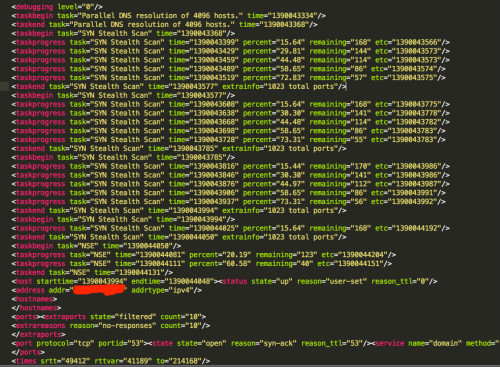
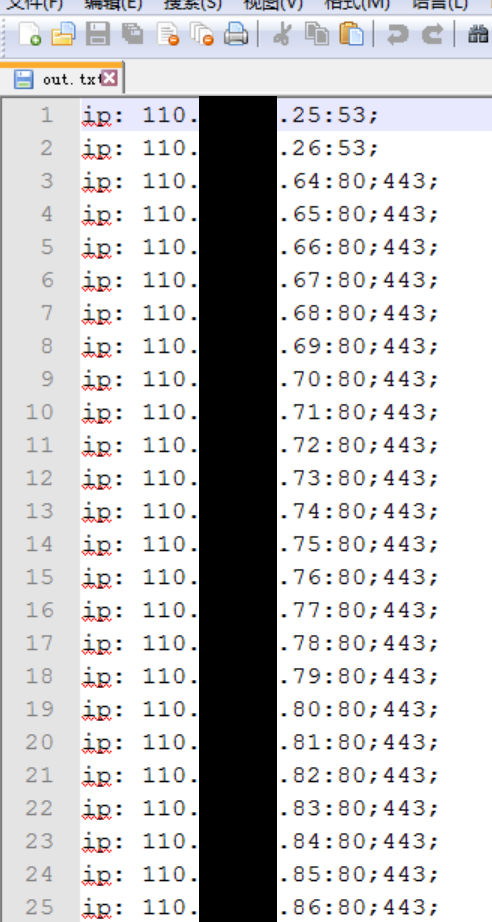
后来想能不能自动化输出扫描出的端口和IP其他的不要,经过2、3小时的折腾,终于搞定了自动化工具。
原理基本上就是xml解析,写了几个Xpath再加上Nmap的无样式参数–no-stylesheet
使用的Nmap命令也是常见的参数
Default
|
1
|
nmap -v -sS <span style="font-size:inherit;box-sizing:border-box;font-family:Monaco, MonacoRegular, "Courier New", monospace;padding:0px;background:transparent;font-style:inherit;margin:0px;border:0px;vertical-align:baseline;height:inherit;font-weight:inherit;line-height:inherit;color:rgb(0, 111, 224);"--<open -iL iplist.txt <span style="font-size:inherit;box-sizing:border-box;font-family:Monaco, MonacoRegular, "Courier New", monospace;padding:0px;background:transparent;font-style:inherit;margin:0px;border:0px;vertical-align:baseline;height:inherit;font-weight:inherit;line-height:inherit;color:rgb(0, 111, 224);"--<no-stylesheet -oX output.xml -p- -P0
|
问题基本解决了,整个工程也才36行,贴出核心代码分享给大家:
Default
|
1
2
3
4
5
6
7
|
xmldoc.SelectNodes("//host/address[@addr]")
xmldoc1.SelectNodes("//port[@portid]")
node1.Attributes.GetNamedItem("addr").Value
node2.Attributes.GetNamedItem("portid").Value
|
妈妈再也不用担心我整理大量端口扫描结果了 
黑客基本功:探索和创造
文章末尾固定信息

我的微信
我的微信
微信扫一扫
评论